New free TD Snap template: Subway Menu
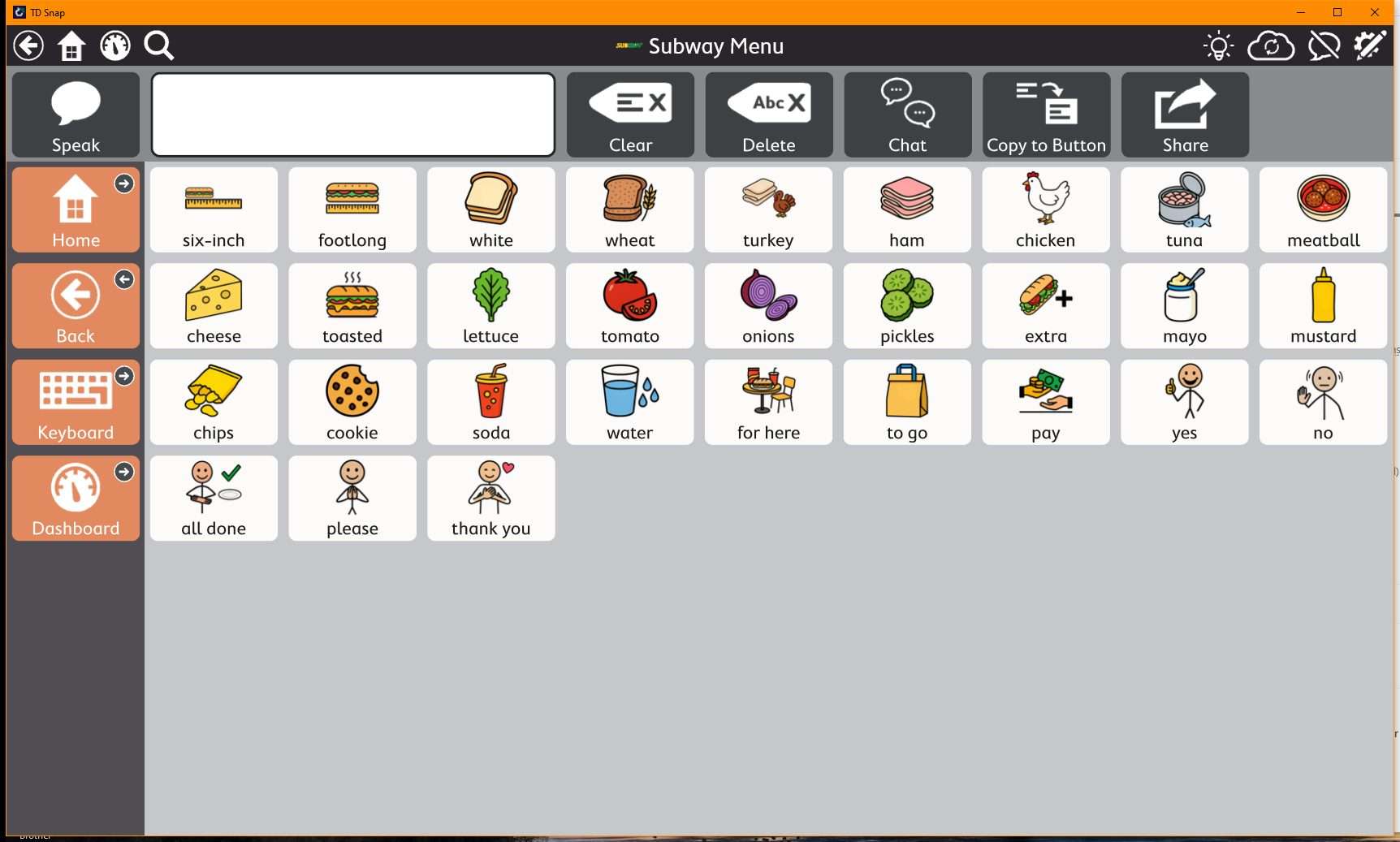
A TD Snap page for ordering at Subway: the size, the bread, the meat, the toppings and sauce, and here or to go.
Ordering a sub is a script, and the worker asks the questions in the same order every time: six-inch or footlong, which bread, which meat, cheese, toasted, which toppings, which sauce, chips and a drink, here or to go. The page follows the same questions, so a student can answer each one when it comes instead of an adult speaking for them.
The questions at the counter are mostly yes or no (toasted?, cheese?, anything else?), so yes and no sit side by side with please, thank you and all done. extra is there for the toppings a child wants more of, like extra pickles.
It is kept small on purpose: two breads, five meats, six toppings and sauces, a few sides and drinks. Fewer choices means a faster, more confident order. It uses the same pictures as our other restaurant menu templates, so a child meets the same picture for the same thing everywhere.
What’s on the pages
- Subway Menu: six-inch, footlong, white, wheat, turkey, ham, chicken, tuna, meatball, cheese, toasted, lettuce, tomato, onions, pickles, extra, mayo, mustard, chips, cookie, soda, water, for here, to go, pay, yes, no, all done, please, thank you.
It is a TD Snap page set. Each page keeps its own fixed grid, so every button shows whatever page set the device uses, and the same row along the bottom moves between its pages. TD Snap templates are new for us: tell us how the import goes.
It is free, like everything in our library. Get the Subway Menu template for TD Snap, or browse the whole free library.
Need something we do not have yet? Tell us what to build. Requests from families are where most of these come from.