New free TouchChat template: Monster Jam 108
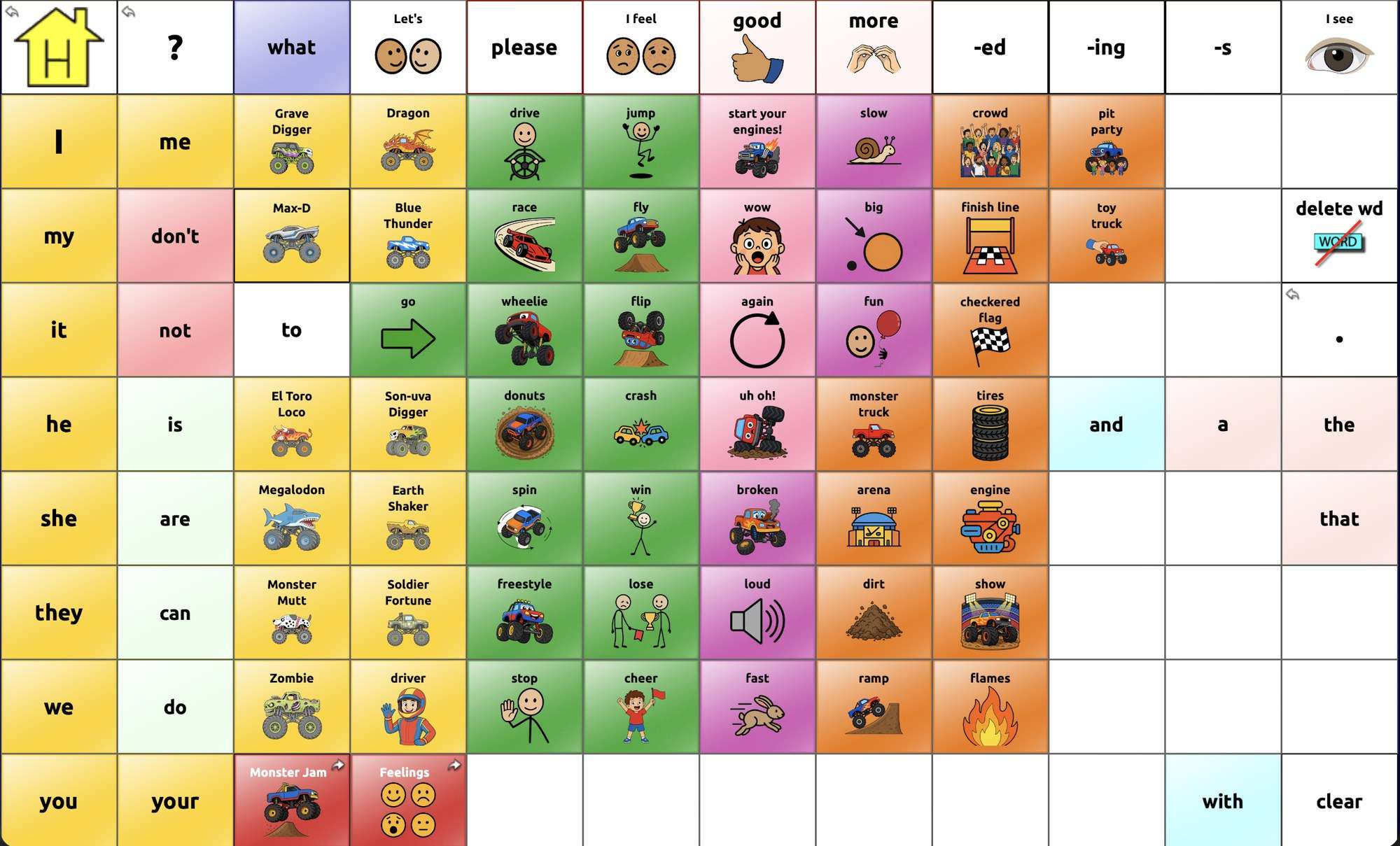
A free AAC template for monster truck fans: twelve famous trucks, the show in order from start your engines to the finish line, and a feelings page that includes too loud and ear protection, for TouchChat WordPower 108.
The first page is every truck a fan names, drawn the way each one looks: Grave Digger, Max-D, El Toro Loco, Megalodon, Monster Mutt, Zombie, Dragon, Blue Thunder, Son-uva Digger, Earth Shaker and Soldier Fortune, beside the show itself in the order it happens: arena, crowd, start your engines, go, jump, flip, wheelie, donuts, freestyle, crash, win, lose, checkered flag.
The Feelings page matters at a live show. Monster trucks are loud, so too loud, ear protection and I need a break sit beside happy, excited, scared and proud, so a child can say how the show feels and ask for a break without leaving the day behind.
What’s on the pages
- Monster Jam 108: Twelve monster trucks, the arena, crowd, dirt and ramp, then the show in order: start your engines, go, stop, drive, race, jump, fly, crash, flip, spin, donuts, wheelie, freestyle, win, lose, finish line and checkered flag, with loud, fast, slow, big, tires, engine and flames.
- Feelings: Happy, excited, scared, too loud, proud, mad, tired, I need a break, help, all done, friend, love, surprised, worried, calm, brave, sad, frustrated, I’m sorry and try again.
It is built for WordPower 108 on TouchChat. That is the one thing worth checking before you download: a page laid out for one grid size will not fit another. In TouchChat you can see which vocabulary is in use under Menu → Vocab → Choose Vocab.
It is free, like everything in our library. Get the Monster Jam 108 template for TouchChat, or browse the whole free library.
Need something we do not have yet? Tell us what to build. Requests from families are where most of these come from.