
Church AAC Template for LAMP Words for Life
A Church page for LAMP Words for Life: going to church, who we talk about, what we do there, short prayers and the words for when it gets long, on one page your child reaches from a single button.
At a glance
- App: LAMP Words for Life
- Grid: LAMP Words for Life, 84 (12 x 7), one page
- Pages: one page
- Cost: Free, no account required
Version 1, released November 7, 2026.
What’s on the pages
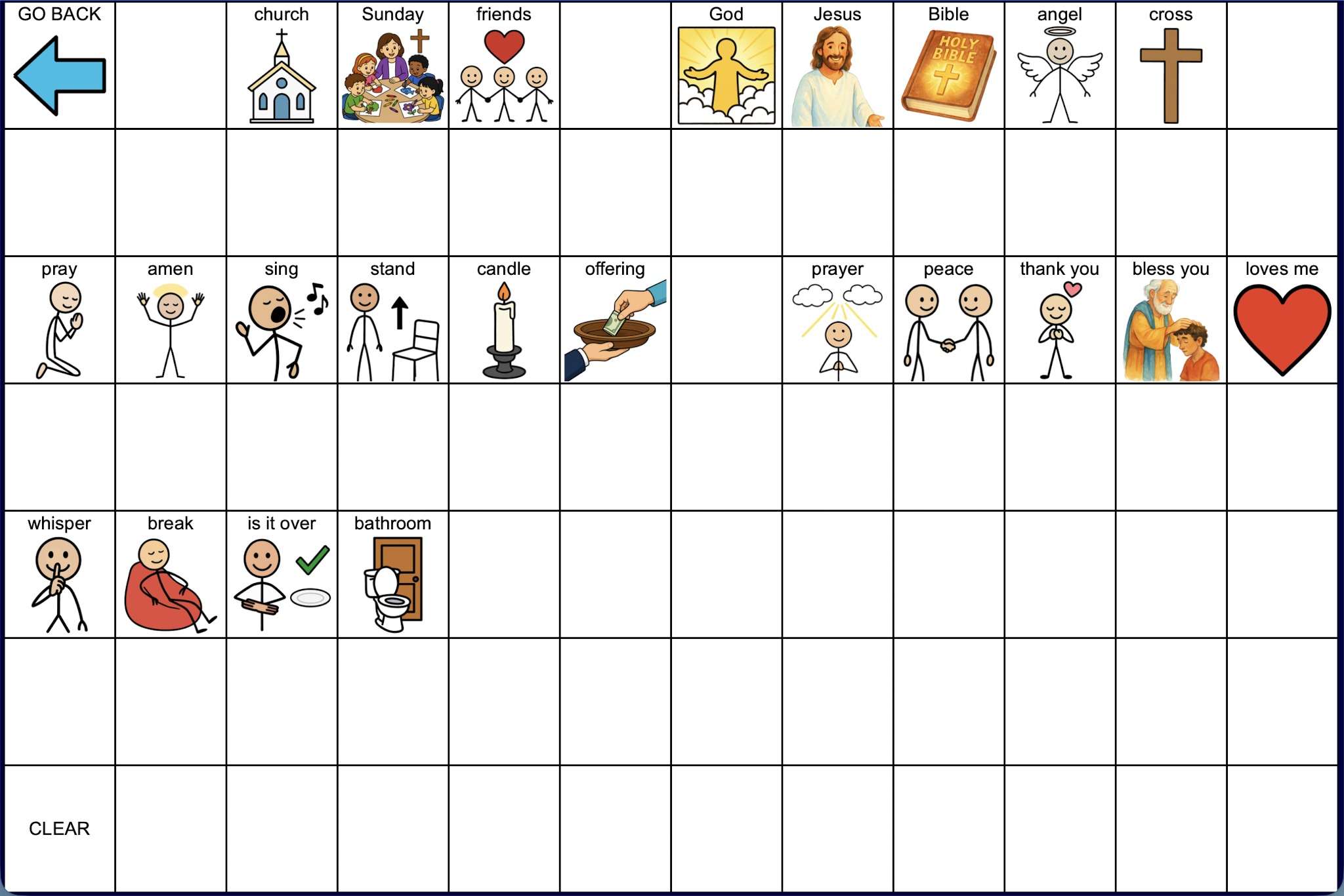
What the pages are
Church. Going to church, who we talk about, what we do there, short prayers and the words for when it gets long.
Why themed Voice Packs work
Everyday words LAMP already has are left off on purpose: their place on the device is your child’s motor plan, so this page carries only what LAMP does not, kept to what most churches share: the people and places of church, singing and praying, short prayers your child can say, and a polite way to say it is getting long.
Motivation drives AAC use. A child handed a board full of clinical vocabulary has little reason to reach for it; a child who can talk about what they already care about has every reason. Themed Voice Packs are not a replacement for a robust core-word system; they sit alongside it. More on core words and themed boards.
How to install
- Download the file above and unzip it. Inside is one LAMP page file (its name ends in LAMP.ce).
- In Files, press and hold the file, tap Share, then LAMP Words for Life (it may say LAMP WFL). Do not just tap it: on an iPad that also has TouchChat, a tap can open TouchChat.
- LAMP asks to import the file: tap Yes, then Save. Nothing in your child’s vocabulary changes yet.
- In your child’s vocabulary, go to Menu > Edit Page > Import Another Page, pick the template (its name ends in LAMP) and import its page.
- On the LAMP page where the topic belongs (a game on games, a holiday on holidays), add one button labeled with the topic’s name that navigates to the new page.
- The full steps, with pictures, are in our installation guide.
Before you import
- Every picture on the page is our own, and LAMP’s motor plans stay exactly where they are: the page is reached from one button you add, so no word your child already knows moves.
- Getting an update? Import the new file the same way and let LAMP replace the page. Your button keeps working.
- LAMP templates are new for us. Tell us how the import goes, good or bad, with the Report a Problem form below.
- Need something changed, or a different grid size? Ask us.
Know when we add new templates
We build these from family requests and give them all away. Drop your email and we’ll tell you when new ones land, nothing else, ever.
Something wrong with this template? Tell us and we will fix it — a button with the wrong picture or the wrong words is a word your child cannot use.
Unofficial. Not affiliated with or endorsed by the owners of the shows, teams, games and characters named here, whose trademarks and copyrights they are. For rights holders