
Disney and Pixar Movie Lines AAC Template for TD Snap
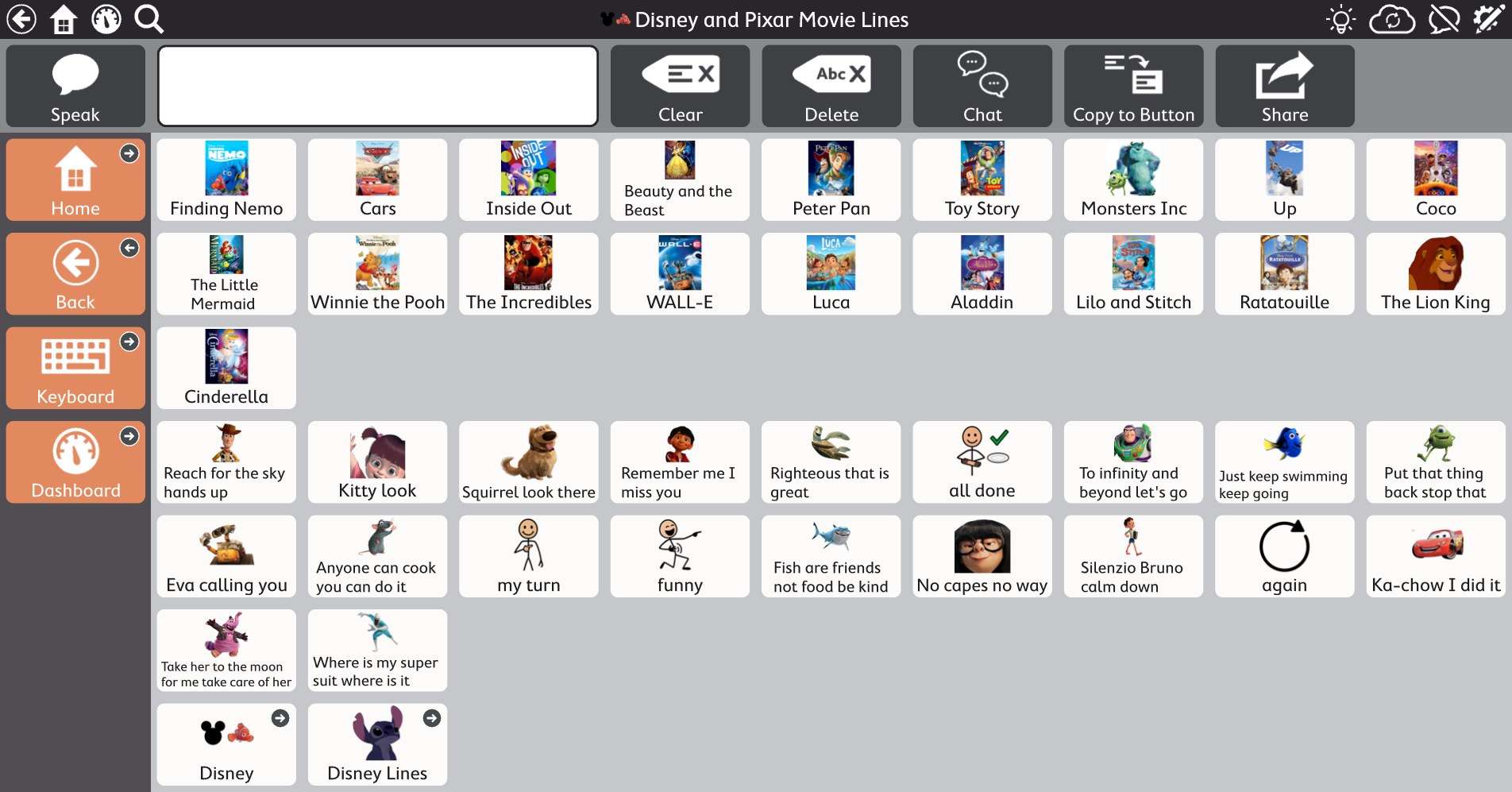
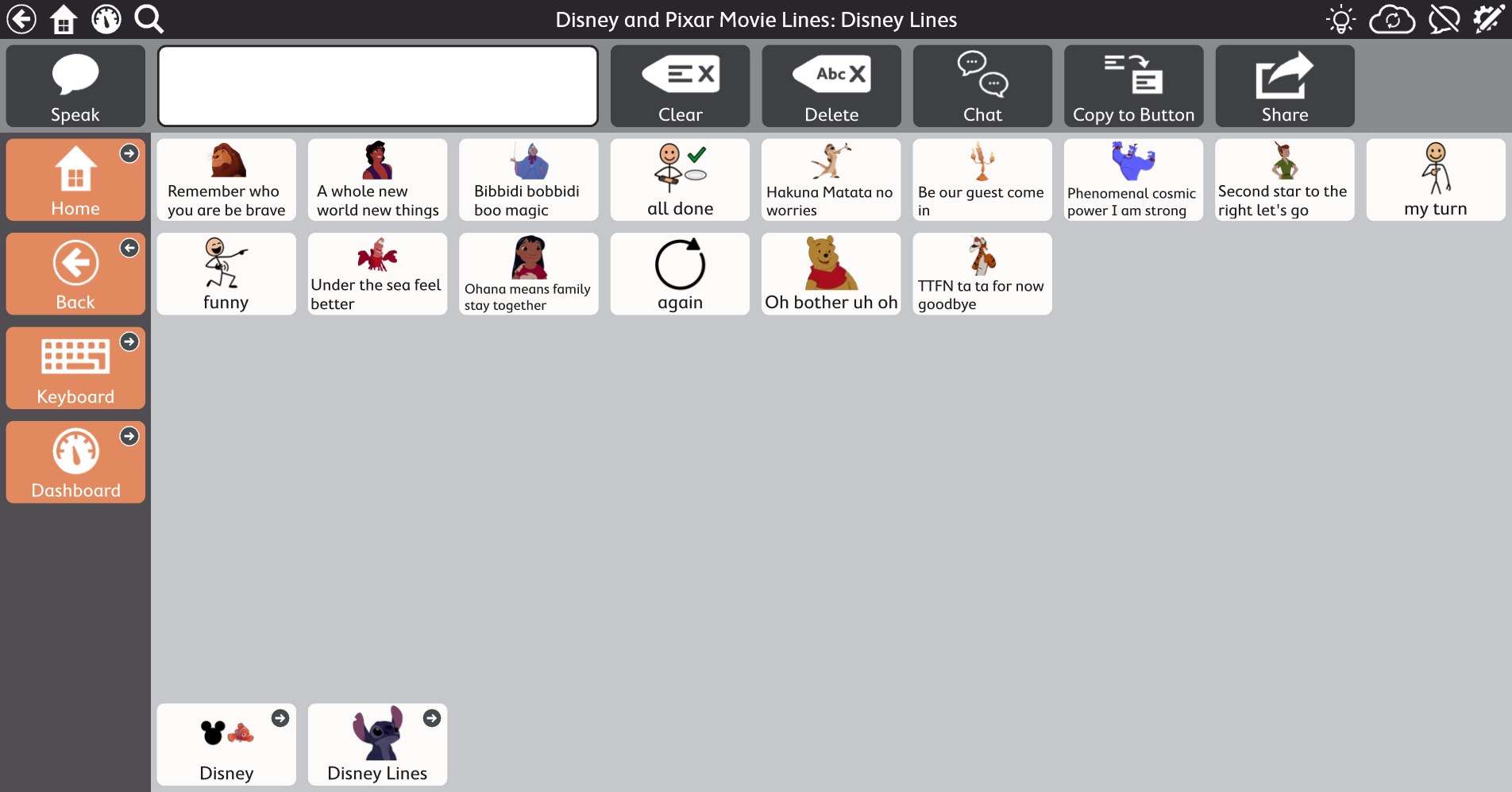
Two TD Snap pages of famous Disney and Pixar movie lines: each button says the whole line, with the character who says it. Made for gestalt language learners, who learn and use whole remembered phrases.
At a glance
- App: TD Snap
- Grid: TD Snap, 9 x 7 page grid
- Pages: 2 linked pages
- Cost: Free, no account required
Version 1, released October 23, 2026.
What’s on the pages
What the pages are
Disney and Pixar Movie Lines. Nineteen film posters, from Toy Story and Finding Nemo to The Lion King and Beauty and the Beast, with whole lines from Toy Story, Finding Nemo, Monsters Inc, The Incredibles, Cars, WALL-E, Up, Coco, Ratatouille and Inside Out below. Tap a poster to say the movie.
Disney Lines. Whole lines from The Lion King, Aladdin, Cinderella, Beauty and the Beast, Peter Pan, The Little Mermaid, Lilo and Stitch and Winnie the Pooh.
What’s included
- Sixteen Pixar lines and eleven Disney lines, each spoken whole
- Nineteen film posters on the first page
- Helper words: my turn, again, all done, funny
- Two linked TD Snap pages on a 9 x 7 grid, with the navigation buttons along the bottom of each page
Why themed Voice Packs work
Many gestalt language learners use whole lines from favorite movies as meaningful units long before they use single words. Just keep swimming can mean keep going, Hakuna Matata can mean no worries, and To infinity and beyond can mean let’s go. Each button speaks the exact line from the film, so adults can model the line in the moment and the student can use it on their own.
The first page holds nineteen film posters so a child can tell you which movie they are thinking of, with the Pixar lines below them. The Disney Lines page holds the Disney lines, and the same helper words sit on both pages: my turn, again, all done and funny, so a line can be asked for again, shared or answered.
Motivation drives AAC use. A child handed a board full of clinical vocabulary has little reason to reach for it; a child who can talk about what they already care about has every reason. Themed Voice Packs are not a replacement for a robust core-word system; they sit alongside it. More on core words and themed boards.
These pages are for joining in, reading together and modeling. Keep teaching where each word lives in your child’s main WordPower vocabulary too.
How to install
- Download the file above and unzip it. Inside is one TD Snap page set file (.spb).
- Put the .spb file on the device: on an iPad, save it to Files under On My iPad > TD Snap.
- In TD Snap, tap Edit, then an empty button, then Link to Page > Import and link to page > From a local file, and choose the file. Pick the template’s first page as the page to link.
- Tap Done. The new button opens the template; the row along the bottom of every page moves between its pages.
- There is a one-minute video of these steps: youtu.be/lAYY34VTAro.
Before you import
- TD Snap templates are new for us. Tell us how the import goes, good or bad, with the Report a Problem form below; it shapes every TD Snap template we build next.
- TD Snap gives the new button a Speak action, so it says the template’s name when tapped. Delete that action in Edit if you would rather it only open the pages.
- A few words use pictures from your own TD Snap symbol library, so those can look different from our screenshots.
- Moving it to a student’s device? Import our whole .spb file there the same way, or, if you export or share it from TD Snap, choose Select All pages first. Sending only the page on screen keeps the buttons but loses the links between pages.
- Need something changed, or a different grid size? Ask us.
Know when we add new templates
We build these from family requests and give them all away. Drop your email and we’ll tell you when new ones land, nothing else, ever.
Something wrong with this template? Tell us and we will fix it — a button with the wrong picture or the wrong words is a word your child cannot use.
Also free for your other AAC app
Unofficial. Not affiliated with or endorsed by the owners of the shows, teams, games and characters named here, whose trademarks and copyrights they are. For rights holders