
Edmonton Oilers AAC Template for TouchChat
One TouchChat board for talking about the Edmonton Oilers: the team’s logo, the players on the ice, the plays, Rogers Place and the cheers, built on the standard WordPower 60 grid.
No device handy? Print the most-used words from this template on plain letter paper and point to talk: in the bath, at the pool, in the car, or when the battery runs out. Same color groups as the device.
At a glance
- App: TouchChat
- Grid: WordPower 60
- Pages: one page
- Cost: Free, no account required
Version 1, released October 26, 2026. Made for TouchChat 2026.2 and newer.
What’s on the pages
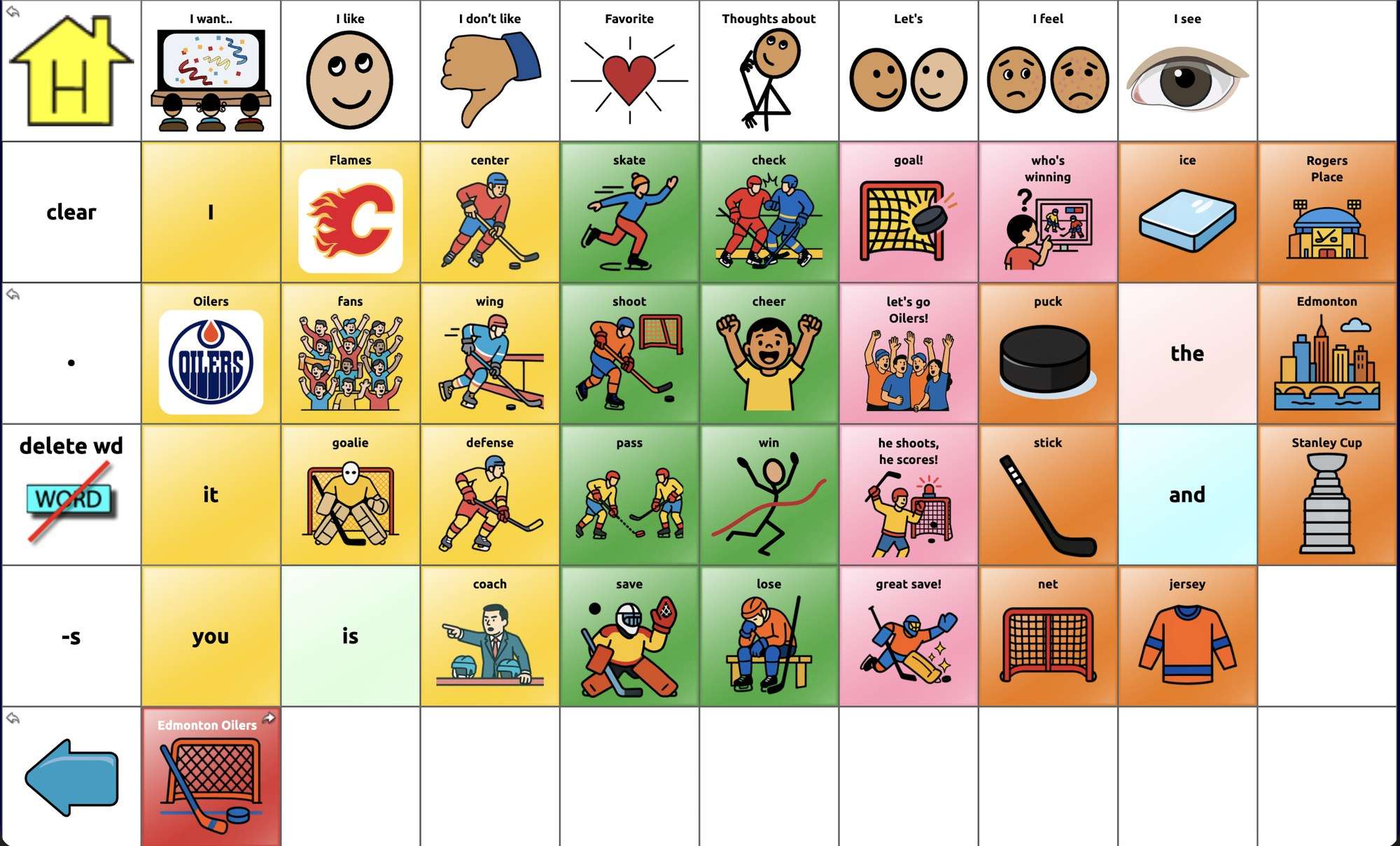
What the pages are
Edmonton Oilers. Oilers, Flames, fans, goalie, center, wing, defense, coach, skate, shoot, pass, score, save, check, cheer, win, lose, puck, stick, net, ice, jersey, Rogers Place, Edmonton, Stanley Cup, goal!, let’s go Oilers!, he shoots, he scores!, great save!, who’s winning.
What’s included
- The Oilers and Flames logos, the orange and blue jersey, Edmonton and Rogers Place
- Cheers: let’s go Oilers, he shoots he scores, goal, great save, who’s winning
- Goalie, center, wing, defense, coach and the plays: skate, shoot, pass, save, check
- 1 board on the standard WordPower 60 grid, so every core word stays where your child already knows it
Why themed Voice Packs work
A fan watching the Oilers wants to say the things fans say: let’s go Oilers!, he shoots, he scores!, great save!, who’s winning. Those are on the board next to the team’s own logo, its orange and blue jersey, Edmonton and Rogers Place, and the Flames, the rival down the highway.
The positions, plays and hockey words sit in colors that match WordPower, and the core words (I, you, it, is, the, and) are in the cells your child already knows.
Motivation drives AAC use. A child handed a board full of clinical vocabulary has little reason to reach for it; a child who can talk about what they already care about has every reason. Themed Voice Packs are not a replacement for a robust core-word system; they sit alongside it. More on core words and themed boards.
These pages are for joining in, reading together and modeling. Keep teaching where each word lives in your child’s main WordPower vocabulary too.
How to install
- Download the file above and unzip it.
- Open our installation guide. Note that TouchChat’s built-in vocabularies are locked, so you make an editable copy first.
- Import the pages into your TouchChat vocabulary.
- Place a page-link button somewhere reachable during a conversation.
- Customize: add the words your communicator actually uses.
Before you import
- TouchChat exports do not carry over “Alternate Pronunciation” settings. If a word is spoken oddly, adjust the spelling on the device after importing.
- There are no player buttons: rosters change every season. If you would like your favorite players added, ask and they will be.
- For every team in the league see NHL Hockey, which carries all 32 logos.
- If a symbol reads wrong to your child, or a word they need is missing, ask and it will be fixed.
- Need something changed, or a different grid size? Ask us.
Know when we add new templates
We build these from family requests and give them all away. Drop your email and we’ll tell you when new ones land, nothing else, ever.
Something wrong with this template? Tell us and we will fix it — a button with the wrong picture or the wrong words is a word your child cannot use.
Unofficial. Not affiliated with or endorsed by the owners of the shows, teams, games and characters named here, whose trademarks and copyrights they are. For rights holders