New free TD Snap template: Burger King Menu
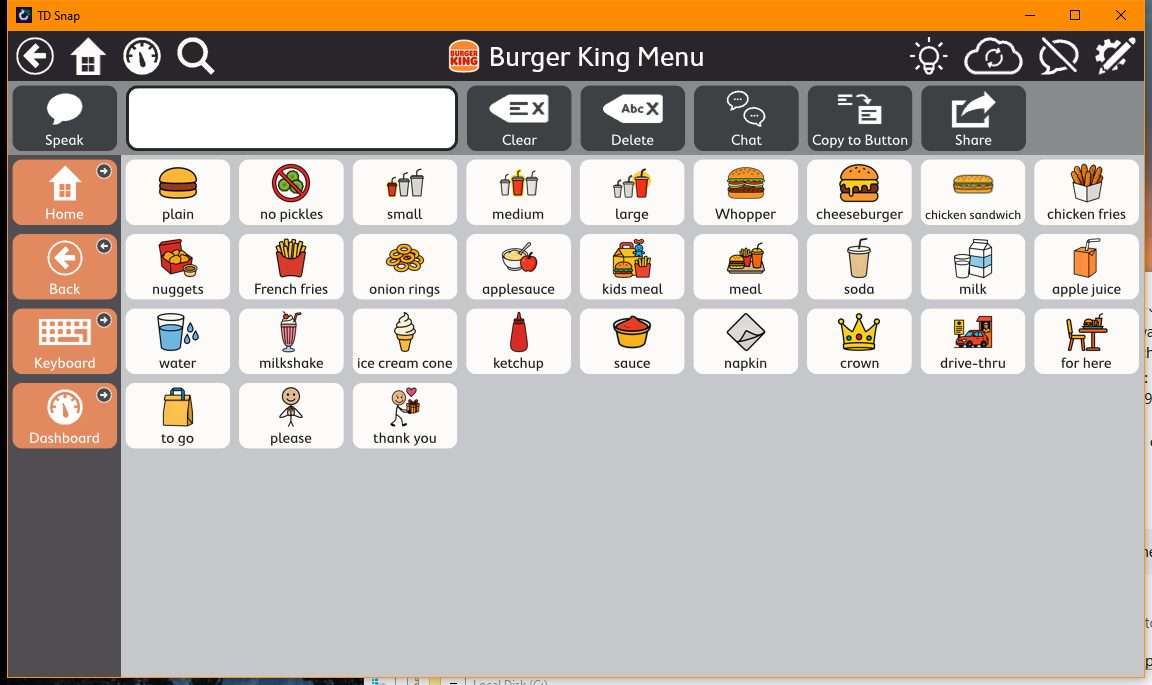
A TD Snap template for ordering at Burger King: a short menu of mains and sides, sizes, here or to go, and thank you.
Ordering at a counter or a drive-thru is a script: what you want, how you want it, what size, here or to go, please, thank you.
It is kept small on purpose. Five mains, Whopper, cheeseburger, chicken sandwich, chicken fries and nuggets, then three sides, French fries, onion rings and applesauce. Fewer choices means a faster, more confident order. And there is a crown button, because asking for the paper crown is half the fun.
The pictures are drawn so the similar things look different at a glance: a big Whopper with lettuce and tomato beside a small cheeseburger, the long Burger King chicken sandwich, and chicken fries that look like chicken, not potatoes.
What’s on the pages
- Burger King Menu: plain, no pickles, small, medium, large, Whopper, cheeseburger, chicken sandwich, chicken fries, nuggets, French fries, onion rings, applesauce, kids meal, meal, soda, milk, apple juice, water, milkshake, ice cream cone, ketchup, sauce, napkin, crown, drive-thru, for here, to go, please, thank you.
It is a TD Snap page set. Each page keeps its own fixed grid, so every button shows whatever page set the device uses, and the same row along the bottom moves between its pages. TD Snap templates are new for us: tell us how the import goes.
It is free, like everything in our library. Get the Burger King Menu template for TD Snap, or browse the whole free library.
Need something we do not have yet? Tell us what to build. Requests from families are where most of these come from.