New free TD Snap template: Critter Clinic
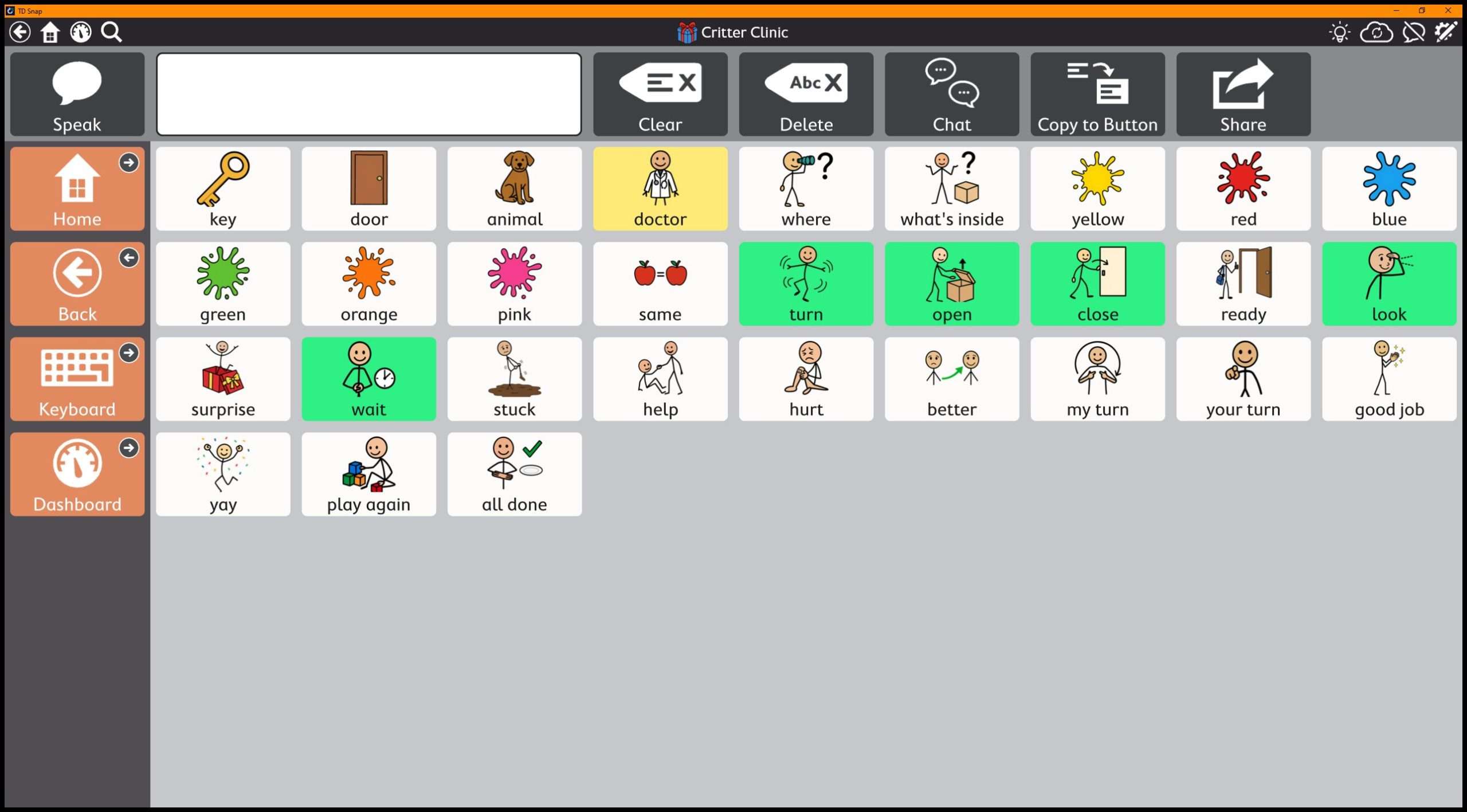
One TD Snap page for the Critter Clinic door-and-key toy: naming the colors, matching keys to doors and saying what is behind each one.
The fun of a door-and-key toy is matching and finding out what is behind each door. The six colors yellow (it also says gold), red, blue, green, orange and pink sit together beside same, so a child can pick a key and say same when it fits. Turn, open, look and ready are the doing words, and surprise is what the door reveals, stuck sits right beside help, and where and what’s inside let a child ask the question the toy is all about. Hurt and better cover the pretend clinic, and my turn, your turn, play again and all done end the game.
What’s on the pages
- Critter Clinic: key, door, animal, doctor, where, what’s inside, yellow, red, blue, green, orange, pink, same, turn, open, close, ready, look, surprise, wait, stuck, help, hurt, better, my turn, your turn, good job, yay, play again, all done.
It is a TD Snap page set. Each page keeps its own fixed grid, so every button shows whatever page set the device uses, and the same row along the bottom moves between its pages. TD Snap templates are new for us: tell us how the import goes.
It is free, like everything in our library. Get the Critter Clinic template for TD Snap, or browse the whole free library.
Need something we do not have yet? Tell us what to build. Requests from families are where most of these come from.