New free TouchChat template: Dairy Queen Menu
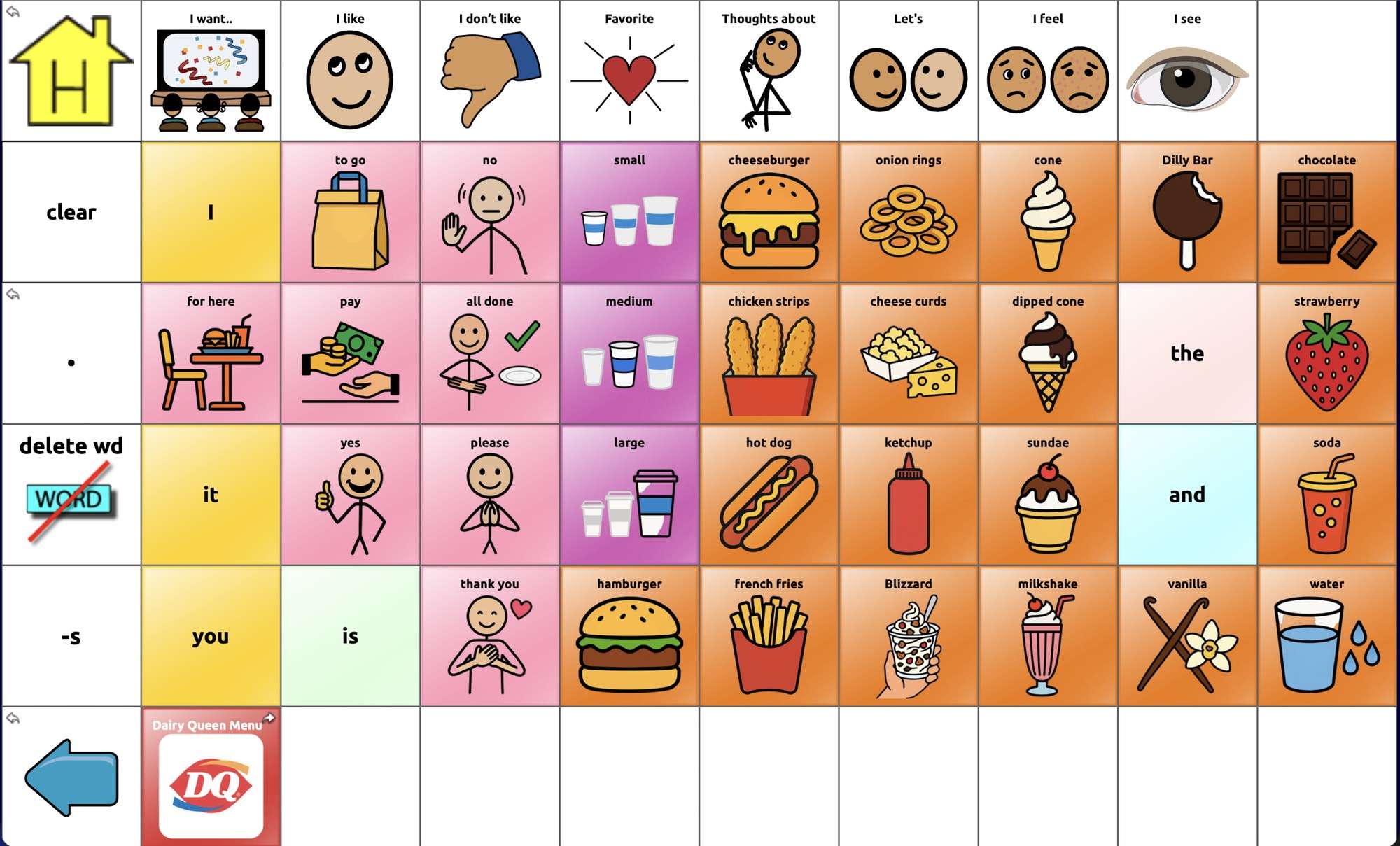
One TouchChat template for ordering at a Dairy Queen counter: the size, burgers, chicken strips and sides, Blizzards, cones, sundaes and shakes, flavors, a drink, and the words for paying and finishing.
Ordering at a Dairy Queen is a script, and the worker asks in the same order every time: what size, what to eat, which treat, which flavor, a drink, here or to go. This board follows that line from the top left, so a student can answer each question when it comes instead of an adult speaking for them.
The questions at the counter are mostly yes or no (ketchup?, a drink?, anything else?), so yes and no sit side by side with please, thank you and all done. The treats sit together with their flavors (vanilla, chocolate, strawberry), so a child can build an order like large Blizzard, chocolate.
It is kept small on purpose: a handful of foods, six treats, three flavors and two drinks. Fewer choices means a faster, more confident order. It uses the same pictures as our other restaurant menu boards, so a child meets the same picture for the same thing everywhere.
What’s on the pages
- Dairy Queen Menu: One board — small, medium, large; hamburger, cheeseburger, chicken strips, hot dog, french fries, onion rings, cheese curds, ketchup; Blizzard, cone, dipped cone, sundae, milkshake, Dilly Bar; vanilla, chocolate, strawberry; soda, water; for here, to go, pay, yes, no, all done, please, thank you.
It is built for WordPower 60 on TouchChat. That is the one thing worth checking before you download: a page laid out for one grid size will not fit another. In TouchChat you can see which vocabulary is in use under Menu → Vocab → Choose Vocab.
It is free, like everything in our library. Get the Dairy Queen Menu template for TouchChat, or browse the whole free library.
Need something we do not have yet? Tell us what to build. Requests from families are where most of these come from.